tl;dr tabernetes turns browser tabs into real Kubernetes nodes. Open tabernet.es on your phone to join my live cluster: the scheduler assigns your tab a pod, and it runs on a Linux kernel booted inside the browser.
Ever since I came across @_pi0_’s work on unkernel.dev, it’s been a chaotic brain-gasm of ideas about running Linux in unconventional places now that it’s economical and practical enough to do even on a phone.11trynix.dev is another project of mine exploring Linux in the browser, which inspired some of my thinking here.
In my last post I introduced tabc, a container runtime that runs each container in a browser tab. Feedback to the project and the post were a mix of curiosity and a surprising amount of skepticism about whether this could actually be useful.
What can you do with a container runtime that treats every browser tab as a potential host?
How about create a massive botnet Kubernetes cluster out of people’s browsers?
The genesis of the idea came from that --link flag in tabc. It made me realize that any browser that opens a link could effectively become a host for a container. If you could coordinate multiple browsers, you could orchestrate them like a real cluster.
By default that URL is only bound to localhost, so it’s meant for your own browser. Nothing in tabc actually cares where the browser lives, though: put a reverse proxy or tunnel in front of it, send the link to a friend, and their laptop runs your container.
$ tabc run --link alpine uname -m
tabc: open this page to start the container:
  http://127.0.0.1:41873/t/8c1f.../
aarch64
If any browser can run a container just by opening a link, then any browser can become a node in “a cluster”. The one thing missing is a way to coordinate them all: a scheduler like Kubernetes.
The end result is tabernet.es, a Kubernetes cluster made out of people’s browsers, phones included!
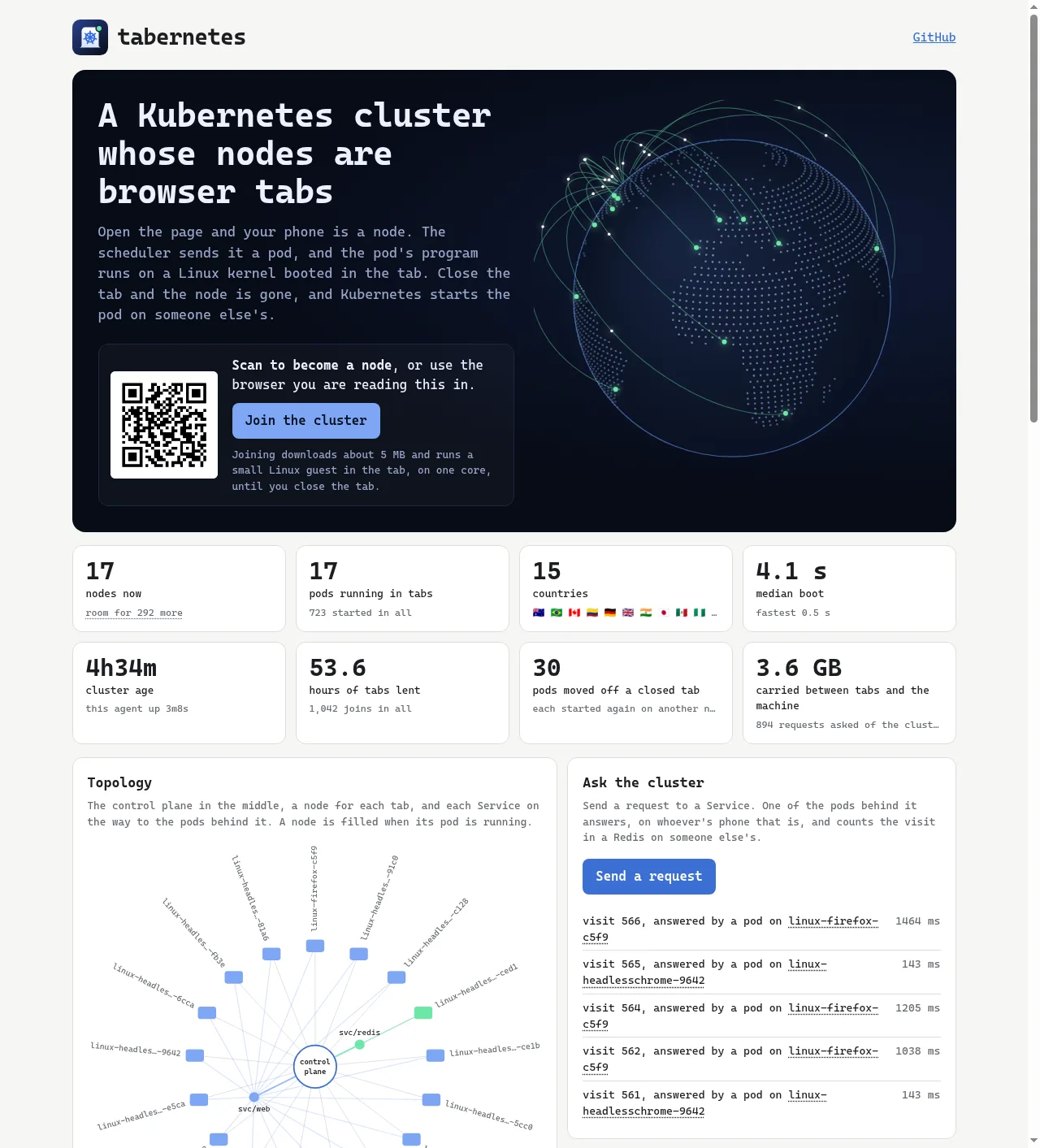
Ready to join? 🧑🍳

Go ahead and scan it (or open tabernet.es/join) and your browser will join my live cluster:
$ kubectl get nodes -o wide
NAME                  STATUS   VERSION        OS-IMAGE                   KERNEL-VERSION           CONTAINER-RUNTIME
pixel-11-pro-3145     Ready    v1.37.2+k3s1   Chrome 158 on Android 17   7.3.4-unkernel (arm64)   tabc://1.0.0
linux-firefox-c5f9    Ready    v1.37.2+k3s1   Firefox 160 on Linux       7.3.4-unkernel (arm64)   tabc://1.0.0
tabernetes            Ready    v1.37.2+k3s1   Ubuntu 24.04.5 LTS         6.12.115 (amd64)         containerd://2.3.7-k3s1
That is a real k3s cluster,22I chose to run k3s because it is a lightweight Kubernetes distribution and I’m running this on a small exe.dev instance. and pixel-11-pro-3145 is just the phone in my hand with a browser tab open. 🤯
The cluster at the moment is configured with two services: one counting visits and another rendering Mandelbrot tiles.
Once you join, your tab displays your pod’s live logs and you can even start a shell. Hit “Send a request” or “Render a picture” on the dashboard a few times and watch the tab start churning with activity.33Please be kind to the server. It is running on a tiny instance with 2 vCPUs and 8 GB of RAM.
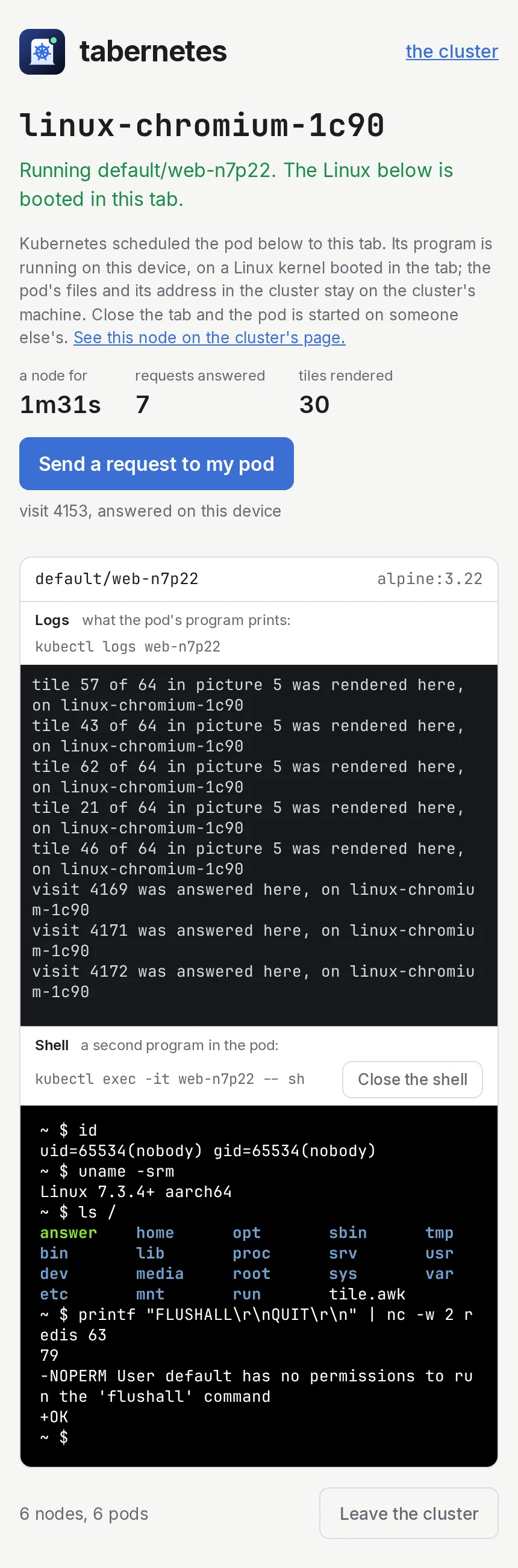
§What is a node, anyway?
As far as Kubernetes is concerned, a node is really just two things: a Node object in the API server advertising some capacity (1 CPU, 256 MiB of RAM, Ready), and a kubelet that keeps renewing its lease and starts whatever pods the scheduler binds to it.
There is no rule saying the kubelet has to run on the same physical machine as the workload it manages.44Virtual Kubelet has been doing this for years to make managed cloud container services look like a single giant node.
tabernetes is a small Go agent sitting next to the API server that acts as a kubelet for every connected browser tab at once.
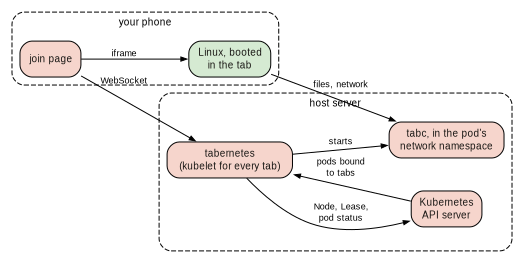
On the Kubernetes side, a pod only needs a single runtimeClassName: tab line to land on a browser. Everything else is standard pod YAML:
apiVersion: v1
kind: Pod
metadata:
  name: hello
spec:
  runtimeClassName: tab  containers:
    - name: hello
      image: alpine
      command: ["sh", "-c", "echo hello from $(uname -m); sleep 3600"]
$ kubectl apply -f hello.yaml
$ kubectl logs hello
hello from aarch64
The agent also labels each Node with whatever the browser reports about itself: the OS platform, browser name, and device model when available. That means you can target specific devices with a normal nodeSelector:
spec:
  runtimeClassName: tab
  nodeSelector:
    tabernetes.dev/platform: Android
That pod will only run on Android phones.
Swap in iOS and you have the world’s first Kubernetes workload with a blue-bubble requirement.55I actually cringed making this joke.
In order to facilitate migrating workloads between the browser and the host, the pod is effectively split in two.
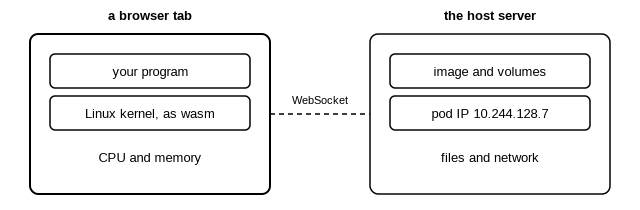
The browser tab supplies the CPU and RAM. Everything else: the container image and volumes, stays on the server.
This is the magic that makes it possible to migrate a stateful service like Redis between different phones without losing its state.66unkernel.dev can actually snapshot a running Linux guest, serialize its memory, and resume it in a completely different browser tab but that requires a graceful shutdown.
§Please don’t run prod on my phone
Did this further exploration change any of those eye-rolls from earlier?
Obviously this is not how you should run production but it does make me think of leveraging possibly the world’s largest pool of disposable compute: people’s phones.77This is reminiscent of distributed computing projects like Folding@home, where people’s personal devices contribute to a larger computational effort.
I continue to be fascinated with exploring what new possibilities arise when running the bedrock component, Linux, in the browser makes possible. It’s wild that a single URL is now enough to turn almost any device on earth into a sandboxed Linux compute node in a couple of seconds.
Go join the cluster at tabernet.es, or check out the README if you want to spin up your own.
Sometimes you build the ridiculous version just to see how far the abstraction actually bends.