git blame for your build’s bytes. 🔍
A build is bit reproducible when the same inputs give the same bytes.
Why does reproducibility matter? They provide certainty that software is genuine and has not been tampered with. See reproducible-builds.org.
Nix is infamously not bit reproducible, but rather input-addressed: the hash of a package is calculated from the inputs rather than the output.
We still prefer though to have bit reproducibility, because it allows us to verify that the package we downloaded is the same as the one built from source. It is something many packages aspire to achieve.
When the outputs differ, you want to know why. The first step is to find the bytes that differ, and the second is to find the program that wrote them.
Finding the cause of a difference has traditionally been the challenging part of process making builds reproducible…until now!
I have been building Rewind VM, a deterministic virtual machine that can record and replay builds, and it now has a new command to find the program that wrote a byte that differs between two runs: rewind blame.
Aside: I wrote about Rewind VM first in a flaky build you only catch once, and then about properties.
Let’s see how it works, first with a small example.
§A small build that is not reproducible
Let’s start with a made-up library, tiles, that writes its pkg-config file with a short
Python script.11nixpkgs sets PYTHONHASHSEED=0 that circumvents this bug. The script collects the packages the library links against into a
set:
requires = set()
for deps in PARTS.values():
    requires.update(deps)

print(f"Requires.private: {', '.join(requires)}")
Python iterates a set of strings in an order drawn from its hash seed, which is random for every new process.
In Rewind the seed is an input: --seed N decides every random
number the build draws. Let’s build tiles under eight seeds:
$ rewind check --epoch 1790985600 --seeds 8 --schedules 0 --all --no-narrow \
    github:fzakaria/rewindvm#tiles
rewind: packing 75 store paths for tiles-0.2.0
rewind: 8 random seeds, each run under schedule 0 and 0 other schedules: 8 runs
seed  0 schedule   0: exited:0       4035 steps  d20b5efd388d  run 8d29a01cc44264b4
seed  1 schedule   0: exited:0       4035 steps  b4501793e383  run c4bd9260b7719942
seed  2 schedule   0: exited:0       4035 steps  0cd5db6c5c2c  run a5448b8d2ca19c18
seed  3 schedule   0: exited:0       4035 steps  24f18f09c329  run b03811e63cc68d97
seed  4 schedule   0: exited:0       4035 steps  b4501793e383  run ed28383bea49e84f
seed  5 schedule   0: exited:0       4035 steps  5e1f0a457cbe  run f5e8d2ac2c4b7782
seed  6 schedule   0: exited:0       4035 steps  d20b5efd388d  run af24df10ae7ac1e8
seed  7 schedule   0: exited:0       4035 steps  b4501793e383  run b5268e20063c5a9e
6 of 7 other runs ended differently
The third column from the end is the start of the output’s hash (i.e. d20b5efd388d), and the last is the run id.
We did eight builds and got five different outputs. 😬 Our build is not reproducible.
rewind diff shows what differs between two runs, without leaving Rewind:
$ rewind diff --file /build/tiles/tiles.pc 8d29a01c c4bd9260
tiles.pc differs, first at line 7.
...
  Name: tiles
  Description: Tile a large image into small ones
  Version: 0.2.0
- Requires.private: pixman-1, libpng, zlib
+ Requires.private: zlib, pixman-1, libpng
  Libs: -L${libdir} -ltiles
You could ascertain this from tools like diffoscope but would be left to figure out what program wrote the differing bytes. rewind blame does that for you.

§rewind blame
rewind blame takes two runs and a file, and names the program that wrote the first byte
that differs:
$ rewind blame 8d29a01c c4bd9260 \
    /nix/store/ihhhzc5q...-tiles-0.2.0/lib/pkgconfig/tiles.pc
tiles.pc differs at byte 178. python3 (pid 112) wrote that byte at step
2,909 in run 8d29a01c and at step 2,909 in run c4bd9260.

22 of 227 bytes differ. The bytes from byte 178:
  8d29a01c  70 69 78 6d 61 6e 2d 31 2c 20 6c 69 62 70 6e 67  |pixman-1, libpng|
  c4bd9260  7a 6c 69 62 2c 20 70 69 78 6d 61 6e 2d 31 2c 20  |zlib, pixman-1, |

Who wrote the file in run 8d29a01c, from the last writer back:
  install (pid 122) copied it from /build/tiles/tiles.pc, starting at
    step 3,157. Its source already differs, so the copy did not cause
    the difference.
  bash (pid 112) wrote /build/tiles/tiles.pc, starting at step 2,796. It
    is the first writer, and the file already differs when it is done.
Run c4bd9260 made the file the same way, with the same programs.

In both runs, one write of 227 bytes, from byte 0, set byte 178.

python3 ran with the same command line in both runs, so the difference
comes from something it read or from randomness.

What python3 read:
  1 file that the build made, all the same in both runs:
    /build/tiles/gen-pc.py.
  31 other files that the build did not make, such as programs and
    libraries.

Likely cause: something inside python3 (pid 112), such as randomness or
the order its threads ran in. Its command line and the files the build
made that it read are the same in both runs.
The output is a little long, but it is all relevant and the first line has the answer: python3 wrote that byte at step 2,909.22The output is real, with long lines wrapped to fit and the store path shortened.
The rest of the text is how the tool determined the provenance of the byte change.
- The file in
$outwas copied there byinstall. The file it copied from already differed, so the copy is not to blame. - That file,
/build/tiles/tiles.pc, was first written by pid 112. It was stillbashwhen it opened the file for the>redirect, and then becamepython3. One write of 227 bytes set byte 178. python3had the same command line in both runs, and the only file from the build it read,gen-pc.py, was the same in both runs.
The tool highlights that the difference was made inside python3, and we know that the seed is the one input that changed. 🎯
The fix is straightforward, we wrap the list with sorted(), and every seed then builds the same tiles.pc. 🙌
-print(f"Requires.private: {', '.join(requires)}")
+print(f"Requires.private: {', '.join(sorted(requires))}")
§How it knows
How can the command deduce the lineage of a byte?
The trick is that blame does not have to search for the write. The run already recorded it.😯
Every Rewind run records each program’s starts, exits, opens for writing and renames,
each at its step.33A step is a moment the virtual machine stops and hands control to Rewind, such as when a program starts or writes to the terminal. Step 2,909 is the same moment every time you replay the run. For blame, the guest’s Linux kernel also keeps two kinds
of record:
- a write record for every write to a file: which thread, which file, where in the file and how many bytes;
- an open record for every file a program opens, for reading or for writing.
The records are written to a buffer in the guest kernel’s memory, a 1MiB buffer, and Rewind copies them into trace.bin at the intervals it has stop the VM anyways. This keeps the runs identical and performant.
I measured the cost of the records in Rewind 0.9.0, and it is small enough to leave them on for every run.
With the records, blame finds the write that set the byte by reading the trace, without replaying either run. It only replays to read a file’s contents at a step.
§In the app
The Rewind app shows the same thing visually. Open the two runs side by side:
$ rewind open 8d29a01c --compare c4bd9260
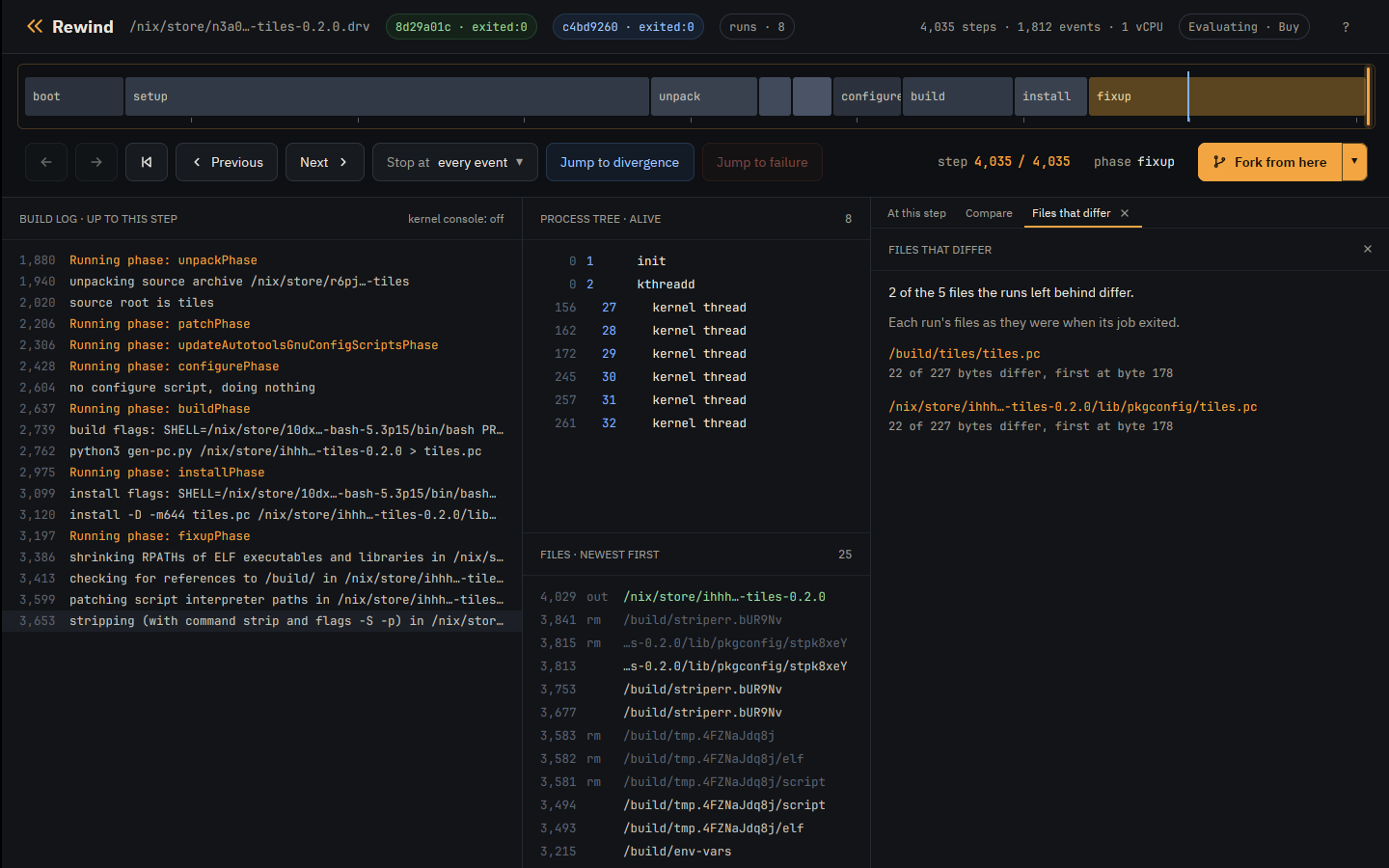
The Compare tab now lists the files that differ between the two runs:
We can also click a file to see it from both runs. Here that is step 2,909, with python3 gen-pc.py in the process tree and its command in the build log:
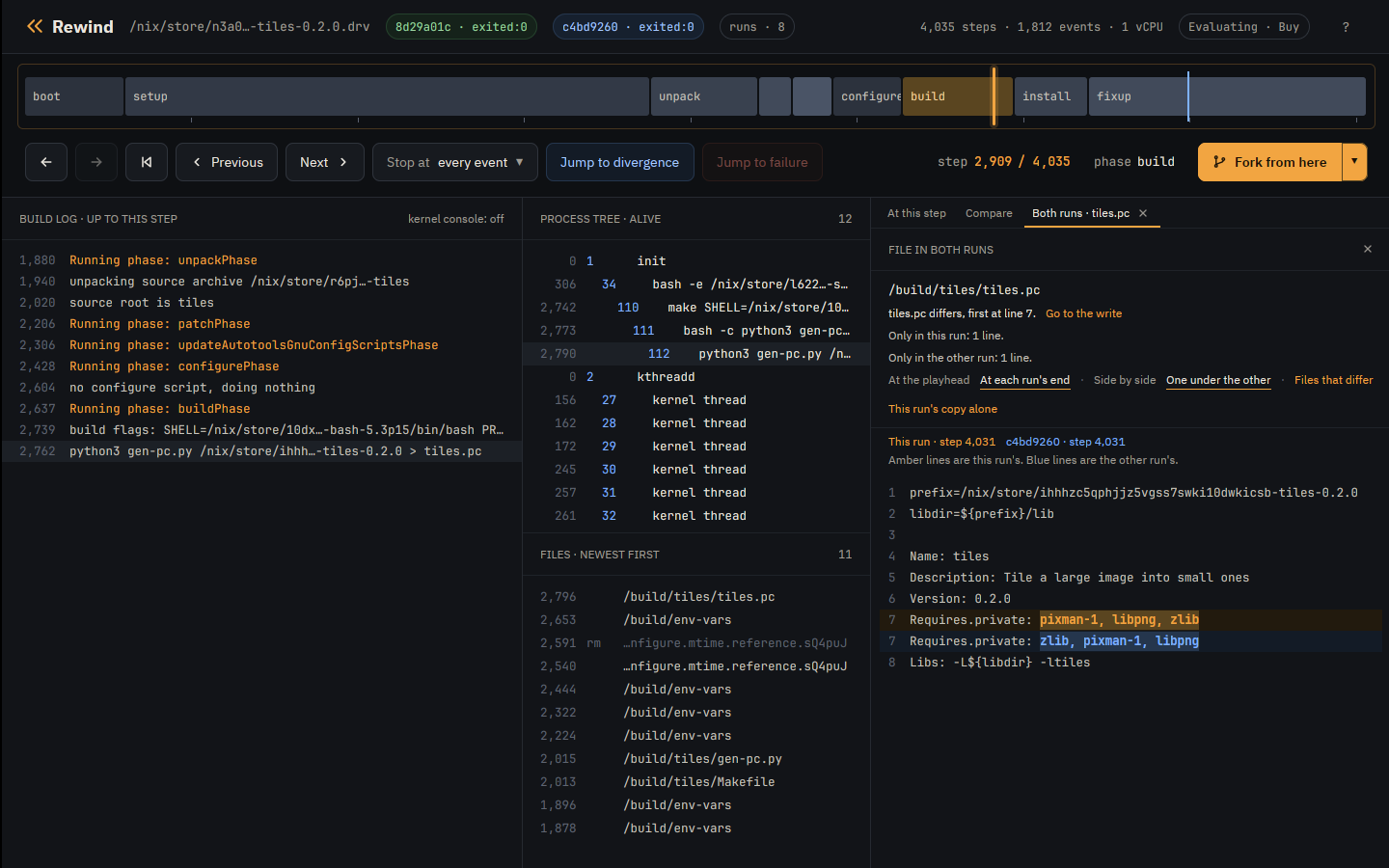
At that moment, we can explore the complete VM state: the files as they were, the process tree, a fork, or gdb. The app shows the same information as rewind blame, but visually and interactively.
§Beyond seeds
In order to capture possibilities of non-determinism, we need to vary any input that can change the output. The seed decides random numbers. rewind check also varies the schedule, the order threads take turns, which is how parallel make and ninja end up with different
outputs.
Turns out there is a third input that can change the output: the order of directories. The order of files in a directory is not guaranteed to be the same across machines, or even across runs on the same machine although many builds assume it to be.
We can also vary the order of directories in Rewind which helps catch even more non-determinism with --dirents. This is useful for builds that depend on the order of files in a directory.
Here is an example of a build that is not reproducible under different directory orders, but is reproducible under every seed44plugins is the second example in the reproducible builds tutorial. :
$ rewind check --epoch 1790985600 --seeds 1 --schedules 0 --all --no-narrow \
    --dirents 3 github:fzakaria/rewindvm#plugins
dirents  0 schedule   0: exited:0       3885 steps  77b96f07540a  run 8d64b8b46c5c8b68
dirents  1 schedule   0: exited:0       3885 steps  3d555b541296  run e4c221b26df20a9c
dirents  2 schedule   0: exited:0       3885 steps  925dde4ef23a  run 593a9430de55e469
dirents  3 schedule   0: exited:0       3885 steps  abd7877043a8  run 067e05c27c9ceb09
3 of 3 other runs ended differently
We have four directory orders, and four different outputs. The build is not reproducible under different directory orders, but it is reproducible under every seed.

§Try it
Finding the cause of a difference has traditionally been the challenging part of process making builds reproducible. Many tools exist to help detect nondeterminism but few actually give you the root cause.
Lowering the barrier to making builds reproducible is a goal of Rewind VM, and rewind blame is a step in that direction. Rewind VM is purpose built to work in the Nix ecosystem and helping make more Nix packages reproducible is a worthy goal.
$ curl -fsSL https://rewindvm.dev/install | sh
$ rewind check --seeds 8 --schedules 0 --all --no-narrow \
    github:fzakaria/rewindvm#tiles
If you want a deeper dive on this subject, check out the reproducible builds tutorial, which walks through both examples step by step, including the directory-order one.
If you maintain a package that does not reproduce and you do not know why, try blame on it, and tell me what it finds. I would love to add it to the leaderboard. 🏆