Debuggers are an incredibly powerful and useful tool, but they mostly show you only the present and let you move forward.11Tools like rr and Undo record a process and let you run its replay backwards. Rewind records the whole machine, the kernel included, so the same inputs make the same run every time. Inspecting the present can help you understand the past, but is that a limitation we must accept?
What if you could travel back in time to see what happened? What if you could see the exact moment a value was written, and who wrote it? What if you could run your debugger backwards?
Rewind is a deterministic virtual machine that records a program’s execution once, and then lets you replay it identically, many times. This lets you run the debugger backwards, and see the history of a value in memory, including who last read and wrote it.
Turns out that you can go backwards by fast-forwarding.
Going backwards changes how you debug: you can see how a value got there, not just what it is now. In who wrote this byte? rewind blame found the program that wrote a byte of a file. That was the easy case. Every write to a file goes through the kernel, and Rewind’s kernel logs each one. Writes to memory don’t go through the kernel, so there is no log to read.
So instead we go backwards, by running forwards again. This is how rewind blame can tell us who last read and wrote a value in memory, and it is the same trick that lets gdb run backwards as well. Let’s see how it works.
Aside: New to Rewind? Start with a flaky build you only catch once and dafuq is a deterministic VM?
§Two tellers, one account
Let’s use the bank example from Nix wrote half of my debugger. Two tellers each deposit 10, twenty times, into one account:
static long balance;

static void deposit(int teller, long amount)
{
	long seen = balance;	char line[64];
	int n = snprintf(line, sizeof line, "teller %d: %ld + %ld\n", teller, seen, amount);

	if (write(1, line, n) == n) {
		balance = seen + amount;	}
}
In our example, crucially, there is no lock around the read and write of balance. If the other teller runs in between, one of the deposits is lost.
rewind check runs the program under different thread schedules until one fails:
$ rewind check --epoch 1790985600 github:fzakaria/rewindvm#bank
schedule   0: exited:0             4547 steps  2ffd6b62eb30  run b1d6981401d5d15f  holds
schedule   1: exited:2             3768 steps    run 36036ed36994d7d8  violates same-outcome, sdk
...
failing: run 240115d5505149aa, schedule 1 over steps 3245..3246
failing run violates sdk: step 3292: always "balance-adds-up" failed: balance 310, expected 400
check narrows schedule 1’s failure down to steps 3,245 and 3,246 and records that run, 240115d5, which is the one we will dig into. We expected 400 and got 310. Nine deposits are gone. 😬
§rewind blame –at
Our program prints the balance at step 3,291. We can run rewind blame at that step and the variable22The expression can be a variable, a pointer dereference, or a struct field. to see who last wrote it:
$ rewind blame 240115d5 --at 3291 balance
balance = 310   8 bytes at 0x56055a0ef030, thread 139, bank.c:69

last written at step 3282 by thread 141 (bank)  bank.c:41  teller  balance = seen + amount;  was 300
other threads just after the write, in step 3282:
  thread 139  bank.c:65  main  __GI___clone3

searched back to step 3210, 1 keyframe window, 1 write, 3.1s
Rewind goes “backwards” through the run, looking for the last write to that value. We can see that the last write was at step 3,282, by teller 2 (thread 141) on line 41.
But wait, 300 + 10 is 310. That write is fine! 🤔

The last write is rarely the bug. The money went missing earlier, when a teller wrote a value it had read much earlier. We need to augment blame with the reads too, to see that.
§Who read it?
--reads lists every read and write of the value, back to the start of the process. Here are the rows around where it goes wrong:
$ rewind blame 240115d5 --at 3291 balance --reads
  step  thread           access  value               where
...
  3244  140 bank         read    110                 bank.c:36  teller  long seen = balance;  balance
  3248  141 bank         read    110                 bank.c:36  teller  long seen = balance;  balance  3250  140 bank         write   120                 bank.c:41  teller  balance = seen + amount;  balance
  3250  140 bank         read    120                 bank.c:36  teller  long seen = balance;  balance
...
  3257  140 bank         write   190                 bank.c:41  teller  balance = seen + amount;  balance
  3257  140 bank         read    190                 bank.c:36  teller  long seen = balance;  balance
  3258  140 bank         write   200                 bank.c:41  teller  balance = seen + amount;  balance
  3263  141 bank         write   120                 bank.c:41  teller  balance = seen + amount;  balance...
searched back to step 3210, 1 keyframe window, 40 writes, 41 reads, 1.8s
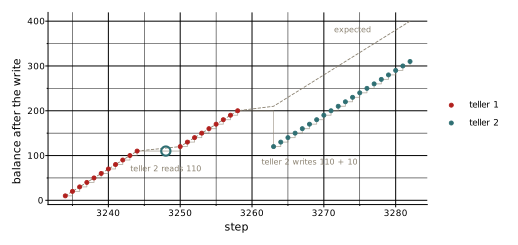
Reading the chronology, we can see that teller 2 read the balance at step 3,248, and then teller 1 made nine deposits, taking the balance from 110 to 200. Then at step 3,263 teller 2 wrote its stale value of 120, overwriting the balance and losing the nine deposits (90). 💣
In this example, the bug is obvious, but in a real program it can be hard to find. The --reads option shows you the whole history of a value, and you can often see where it went wrong without ever setting a breakpoint. You can even see the bug in the plot of the balance over time:
The example is simple and the fix is obvious: a lock around the read and write. In a real program, the bug can be subtle and the fix complex. Seeing the history of a value, and who last wrote it, can be invaluable in tracking down the root cause.
§In the app
The Rewind app gives the same information but in a more interactive way. The source panel underlines every value that blame can watch:
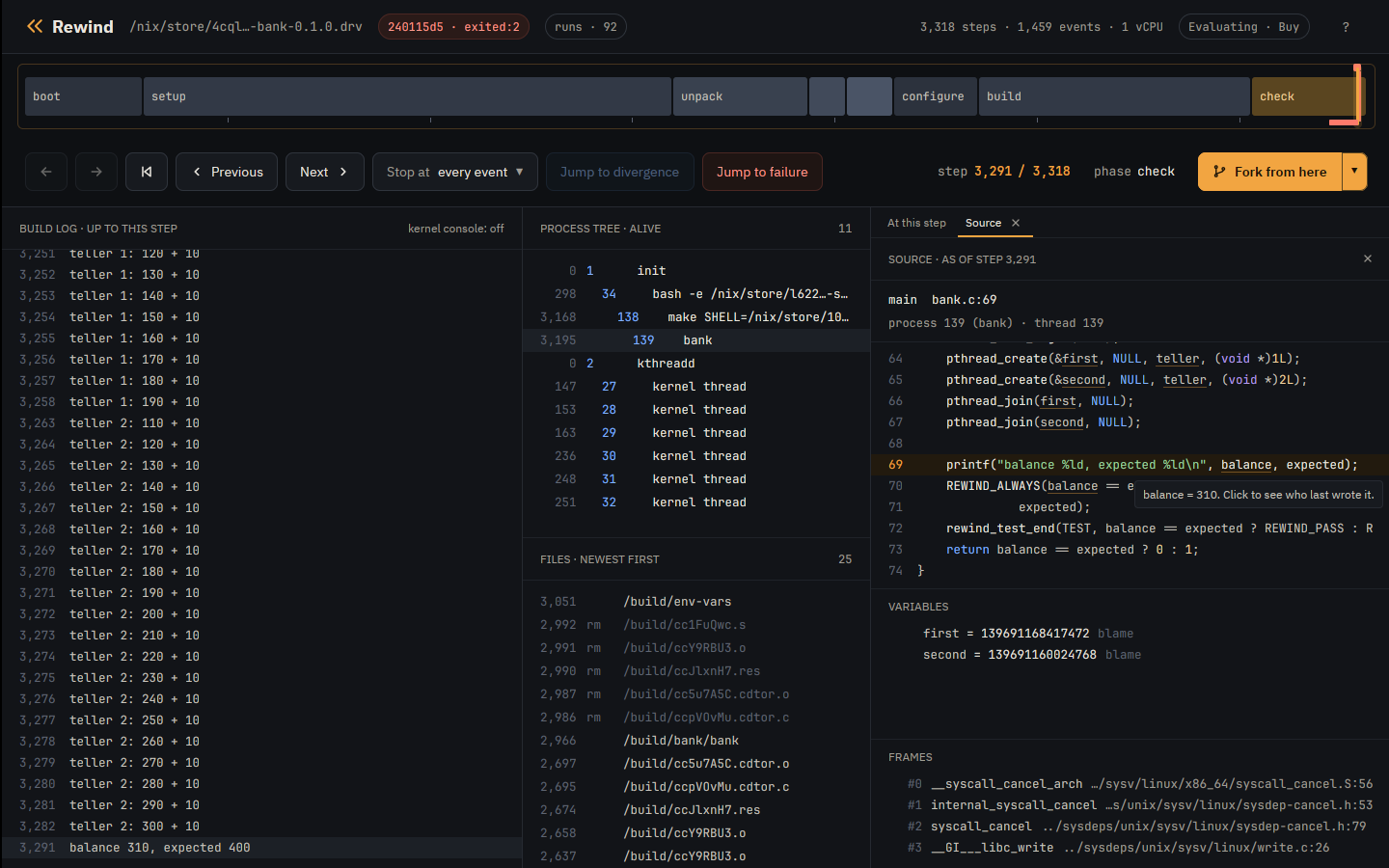
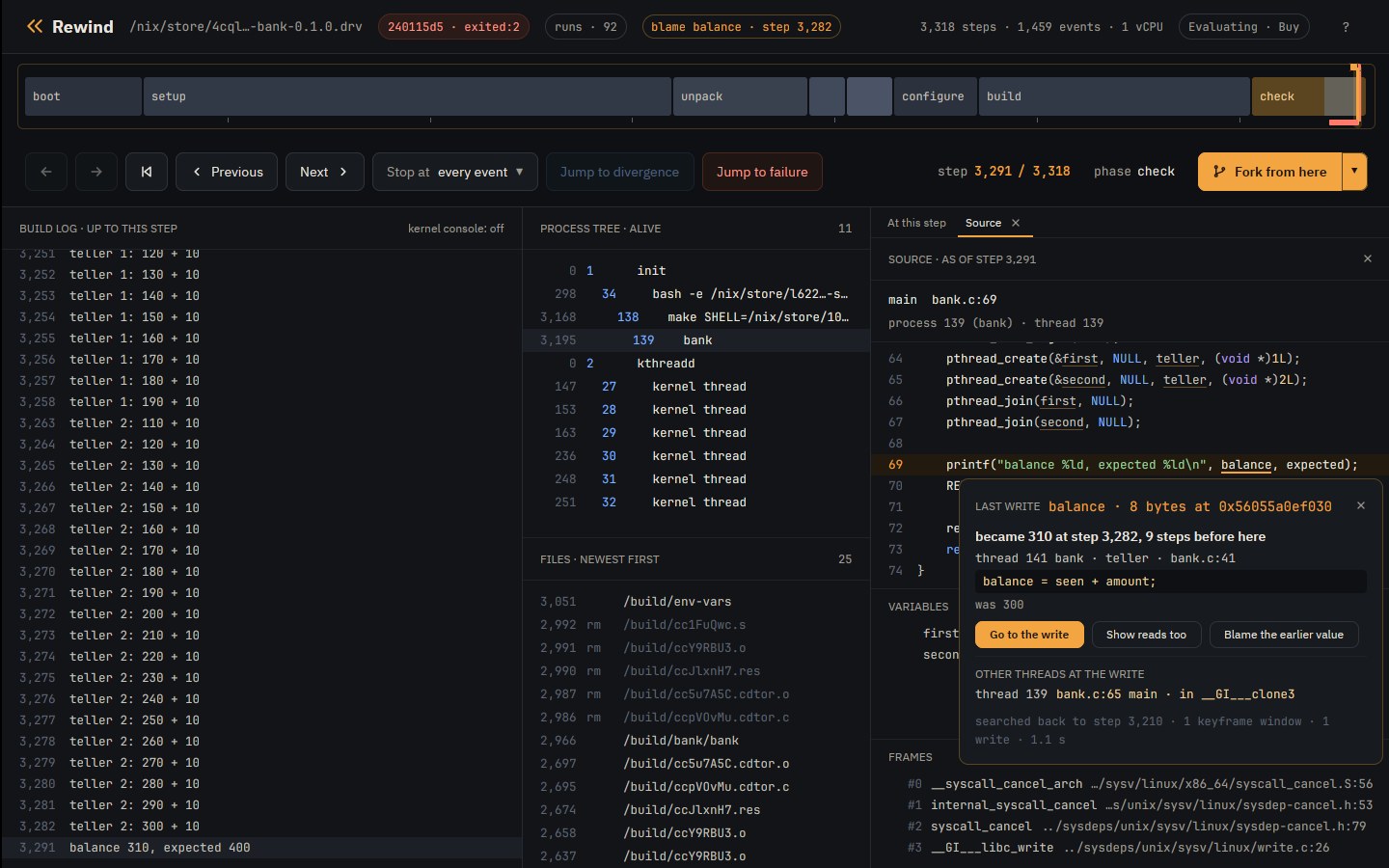
You can click on the value to see who wrote it, and then click Show reads too to see the whole history of that value.
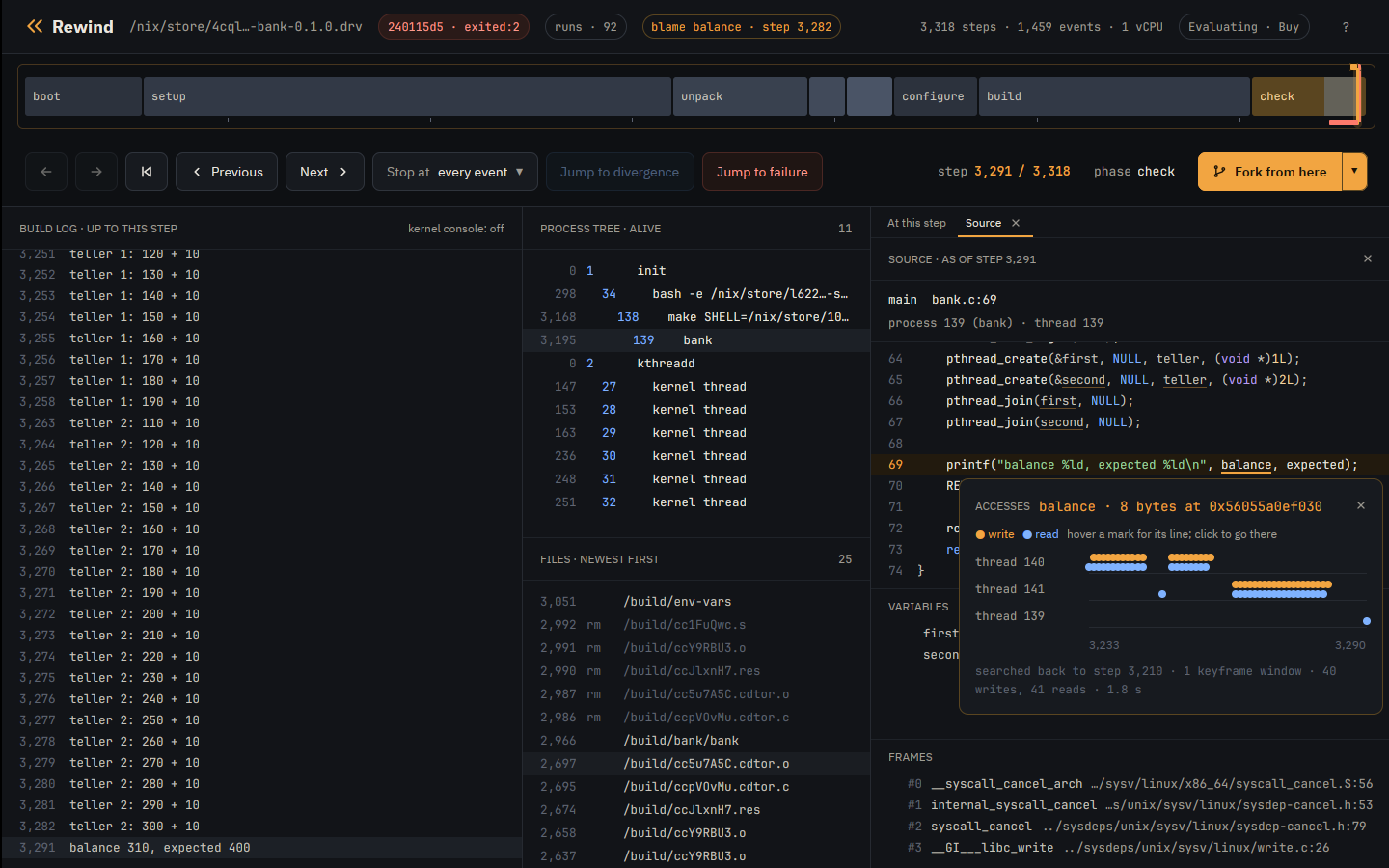
Show reads too draws every access, one lane per thread. Teller 2’s lone read sits in the middle of teller 1’s deposits, and that one dot is the bug. 🙌
§gdb, backwards
If you would rather drive, rewind gdb can go backwards too by setting a watchpoint and reverse-continue. Here it is forked at step 3,264, just after teller 2’s stale write:
$ rewind gdb 240115d5 3264
(gdb) watch balance
Hardware watchpoint 1: balance
(gdb) reverse-continue

Thread 3 hit Hardware watchpoint 1: balance

Old value = 120New value = 2000x000056055a0ec50d in deposit (teller=2, amount=10) at bank.c:41
41			balance = seen + amount;
You can navigate the stack, inspect variables, and step backwards with reverse-step and reverse-next.
§Rewinding by fast-forwarding
How does this all work? How do you run a VM backwards?
You don’t. 😅

Rewind replays are completely deterministic: the same run produces the same result every time. Turns out that a simpler way to go backwards is to run forwards again, but stop one instruction sooner than last time. That is all blame and reverse-continue do.
Rewind keeps a checkpoint of the machine at the start of a step. It rewinds to that checkpoint and then runs forward back to the step you want to inspect making note of every read and write along the way. If no reads or writes are found, it rewinds to the previous checkpoint and runs forward again. It keeps doing this until it finds the last read or write before the step you want to inspect.33A step can be millions of instructions, so this can take a little bit.
Deterministic replay is what makes this work, and it keeps the implementation simple: going back is just going forward again from earlier.
I’ve been having a lot of fun debugging my own programs this way. It’s a bit like time travel without the paradoxes. You can see the whole history of a value, and who wrote it, without setting a breakpoint and restarting the program.
It’s git blame for your program’s memory. 🔍